Distributing your Android apps using F-Droid.
Published on 2/3/2024
In a project, I need to distribute an Android app privately, avoiding both public exposure and the app store listing process. F-Droid Repository offers an excellent solution for this. In this article, we will delve into the steps to set up an F-Droid repository.
Requirements
- A Linux server; I’ll use an LXC container running Ubuntu 24.04.
Installing server tools
Debian-based distributions include the fdroidserver package in their package manager. You can install it with:
sudo apt-get install fdroidserverFor the latest version, add the F-Droid PPA and update:
sudo add-apt-repository ppa:fdroid/fdroidserver
sudo apt-get update
sudo apt-get install fdroidserver
Install Web server
The fdroid command prepares the repository files, but you’ll also need a web server to serve them. I recommend using Nginx:
sudo apt install nginxPreparing the F-Droid Repository files
On Ubuntu 24.04, the default web root is /var/www/html. Create a folder named fdroid and initialize it with fdroid:
mkdir /var/www/html/fdroid
cd /var/www/html/fdroid
Then initi the folder using fdroid command:
fdroid initThis will create a basic F-Droid server structure. You’ll see two files and one folder:
-rw------- 1 root root 14572 Sep 27 12:43 config.yml
-rw------- 1 root root  4312 Sep 27 12:43 keystore.p12
drwxr-xr-x 2 root root  4096 Sep 27 12:43 repo
To serve your app, copy the APK to the repo folder and update the repository:
cp ~/godot_class_reference-v0.5.2-all.apk /var/www/html/fdroid/repo
fdroid update --create-metadata
Now, if you visit http://[your LXC's IP]/fdroid/repo/ in your browser, you’ll see that the F-Droid Repository has been set up successfully. 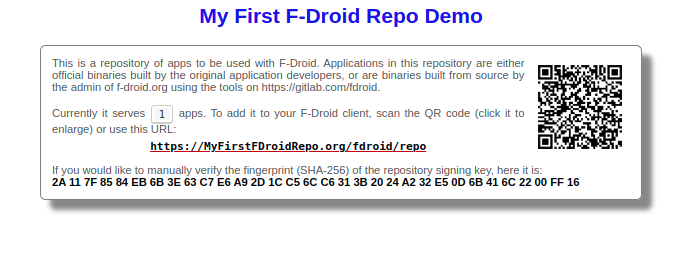
Serve the repository
Currently, the repository is only available on your local network. To make it accessible globally, set up a reverse proxy. You can use tools like frp or ngrok if you have a VPS, or set up a Cloudflare Tunnel.
Change the Repository configuration
You can modify the repository name and URL in the /var/www/html/fdroid/config.yml file. The file contains helpful comments, or you can refer to the example config file.
Adding Repsitory to F-Droid
Open F-Droid on your phone, go to Settings -> Repositories, and tap the plus button. You can either scan a QR code or enter the URL manually. After tapping ADD REPOSITORY, you should be able to search for and install your app.